
By Leila Byron
This weekend I’ve been playing around with Claude’s Cowork mode, and I have three experiments I want to share — both the outputs and the process behind them. Happy to share the full prompts too.
The problem worth solving
Three things have been sitting on my to-do list for a while:
- Making our design team’s weekly project digest less manual
- Capturing and sharing meeting recordings and notes automatically (which also solves the out-of-hours problem that comes with team rotations)
- Automating a bi-weekly highlights digest across the wider design organisation
None of these are hard problems individually, but they all eat time in a way that adds up. Design Ops is largely about reducing friction and making communication consistent — and these felt like obvious candidates for automation.
Experiment 1: Automating the weekly project digest
Every Monday, we share a digest of what’s happening across our active projects — around 12 at any given time — with design leadership in Slack. It sounds simple, but pulling status updates from each project in Linear, summarising them, formatting them consistently, and posting at the right time takes a non-trivial chunk of the morning.
I used Claude to automate the whole thing end-to-end. Every Monday at 9 AM, Claude now:
- Pulls the latest status update from each active Linear project
- Distils each one into a 1–2 sentence summary
- Formats everything into our standard structure (top highlights first, then all other project updates)
- Posts directly to our team Slack channel, no manual input from me
What the input looks like:
The prompt gives Claude two things: a copy of a previous week’s digest as a format template (so it knows the exact structure, action items at the top, then top highlights, then all other updates), and the list of project names. That’s it.
What Claude is doing behind the scenes:
Using its Linear integration, Claude searches for each project by name, retrieves the project IDs, and fetches the most recent status update for each one. It maps those updates into the template format, decides which projects belong in the top highlights based on recent activity, condenses each update to a sentence or two, and flags any project where no update has been posted that week. The Slack integration handles the posting, and a scheduled task runs the whole thing automatically each Monday.
The one section we still write manually is the “action items / notes” at the top. That’s intentional, it’s where we add anything specific to the week that a project management tool wouldn’t know about.
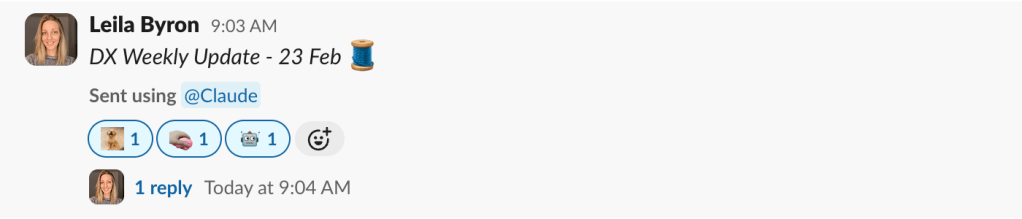
Output: Digest delivered directly to our team Slack channel, Mondays at 9 AM.
Experiment 2: Automating a bi-weekly highlights digest
Every two weeks, we publish a post pulling highlights from across the design organisation, organised around four design goal areas: People, Process, Product, and Brand. It’s a meaningful piece of communication, but assembling it by hand means visiting each team’s update page, reading recent posts, selecting the right highlights, and formatting everything consistently. It takes real time.
I built a prompt that drafts this automatically. The output has been genuinely impressive. Not all teams will have posted updates by the time the draft runs, but Claude flags exactly which teams are missing, so whoever is writing the digest knows what to chase.
What the input looks like:
The prompt explains the digest format in detail: how highlights should be organised under each goal area, and the structure for each entry, a header (team name and title), a 1–2 sentence body describing the work, a note about which image best represents the highlight, and any relevant links to design files, project trackers, or source posts. It then provides a list of URLs, one per design team’s update page.
What Claude is doing behind the scenes:
Claude visits each team page using its web browsing capability, reads the most recent posts since the last digest, identifies the strongest highlights per team, and categorises them under the relevant goal area. Where a team hasn’t posted yet, it notes the gap rather than silently skipping it. The output is a structured draft, organised and formatted, ready to review and publish.
The goal is a solid first draft: Claude does the heavy lifting, a human reviews and adjusts. The prompt can be refined over time based on what’s working.
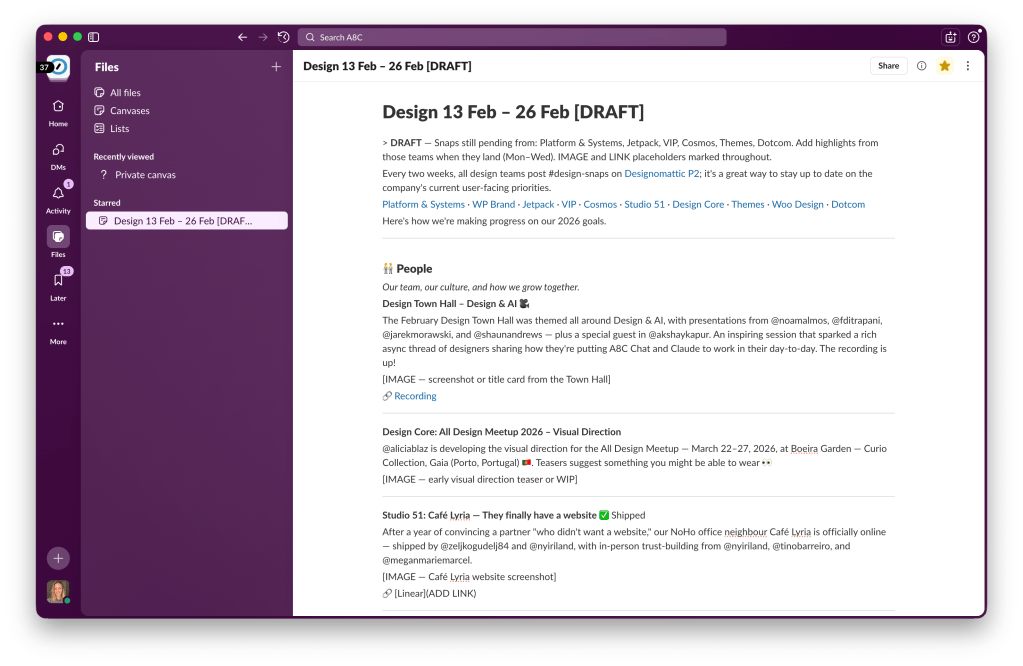
Output: Posted as a canvas in Slack for review before publishing.
Experiment 3: Automating meeting notes (in progress)
Team rotations mean some meetings fall outside working hours for me. For those meetings, we don’t need to be actively present, we just need the notes captured and posted. So I’ve been building a pipeline to handle this automatically, which would also make attendance optional for meetings where you’re not actively contributing.
The intended workflow:
Fireflies.ai → Webhook + Script → Claude → Internal blog───────────── ───────────────── ──────────── ─────────────Bot joins meeting Fires on meeting Structures: Posts:Records + trans- end, passes • Summary • Video linkcribes everything transcript to • Action points • Summary(no manual Claude with owners • Action points record needed) + deadlines • Full transcript • Tags Tagged + ready
Fireflies joins the meeting as a bot → records and transcribes without anyone needing to hit record → when the meeting ends, a webhook triggers a small script → the transcript goes to Claude → Claude structures a summary, action points with owners and deadlines, and relevant tags → the whole thing posts automatically, tagged and ready.
Where I hit friction:
My first instinct was to use Zapier. I got Fireflies set up, but hit a series of walls: the connection kept expiring with authentication errors, and when I finally sorted that, the next integration had stopped working entirely. I ended up skipping automation platforms altogether and building a small custom script hosted on Vercel instead, which turned out to be simpler and more reliable.
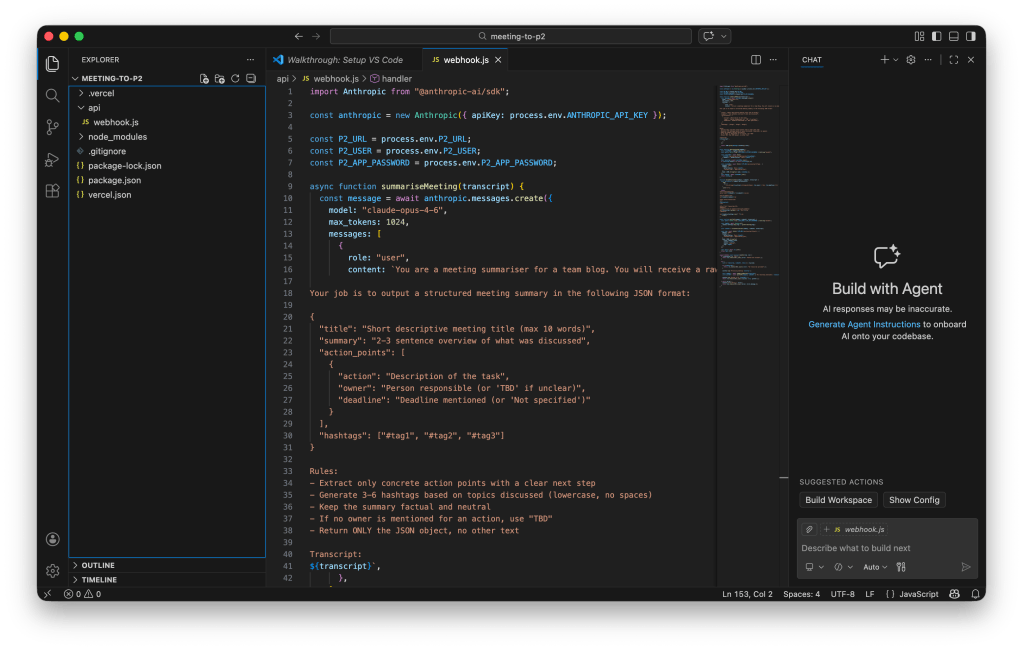
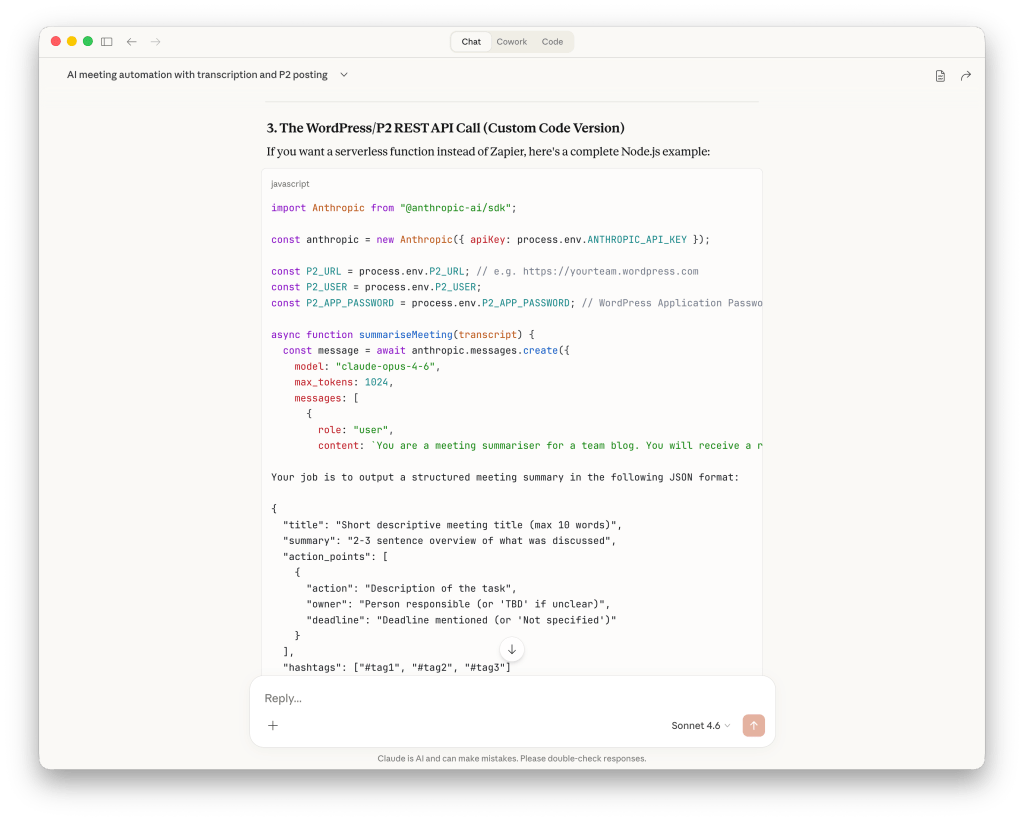
The honest takeaway from the Zapier detour: for simple one-step automations, it’s great. But once you’re chaining multiple API connections together, a lightweight custom script is often less friction in the long run, not more.
Where I’m currently stuck: the final step of posting automatically to our internal blog, due to some platform-specific access considerations. I’m waiting on input from a developer to work through this. But the first two steps, recording and transcription, are working, and I’ve been testing in our weekly team call.
Output: Transcripts saved and shared in Fireflies; summary, action points, and video link posted automatically after every recording.
The broader pattern
All three of these automations follow the same basic shape: a consistent source of truth, a fixed output format, and a delivery channel. Claude handles the middle bit.
If your team has any recurring reports, digests, or meeting notes that get assembled by hand, this is a genuinely useful pattern to try. The setup is lighter than you might expect, each of these took under an hour to get to a working state.
Happy to share prompt templates, walk through setting something up for your own workflow, or compare notes on where you’ve hit similar walls.
Tools used: Claude Cowork, Linear, Slack, Fireflies.ai, Vercel, Zapier (briefly)
 Leila Byron
Leave a comment